Managing vending machines from one place
Digital Planet develops software that connects compatible vending coffee machines into a common management and monitoring system. The operator sees the status of the machines, the sales and the latest orders, while the service technician gets access to the available diagnostic information.
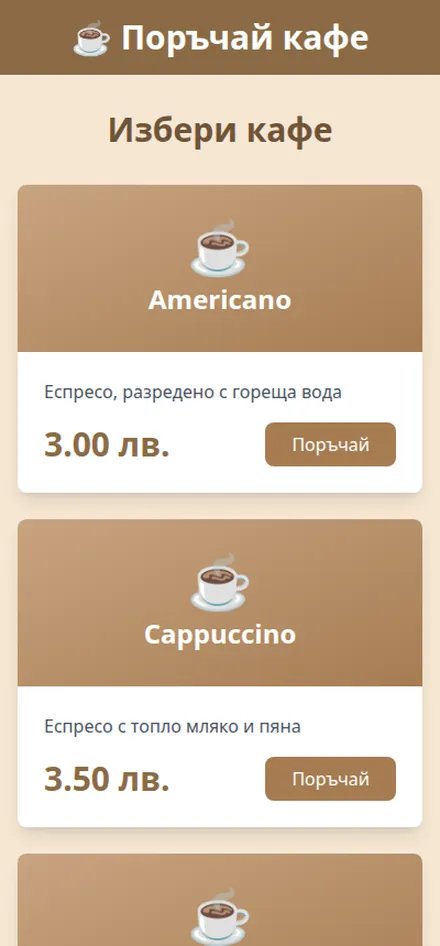
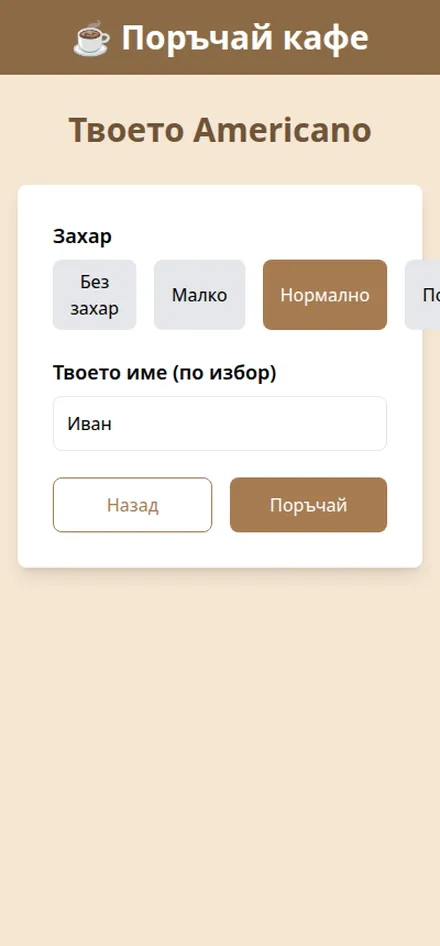
The customer scans a QR code on the machine, opens the menu in the phone browser, chooses a drink and its settings, pays and follows the status of the order. There is no mobile app to install.
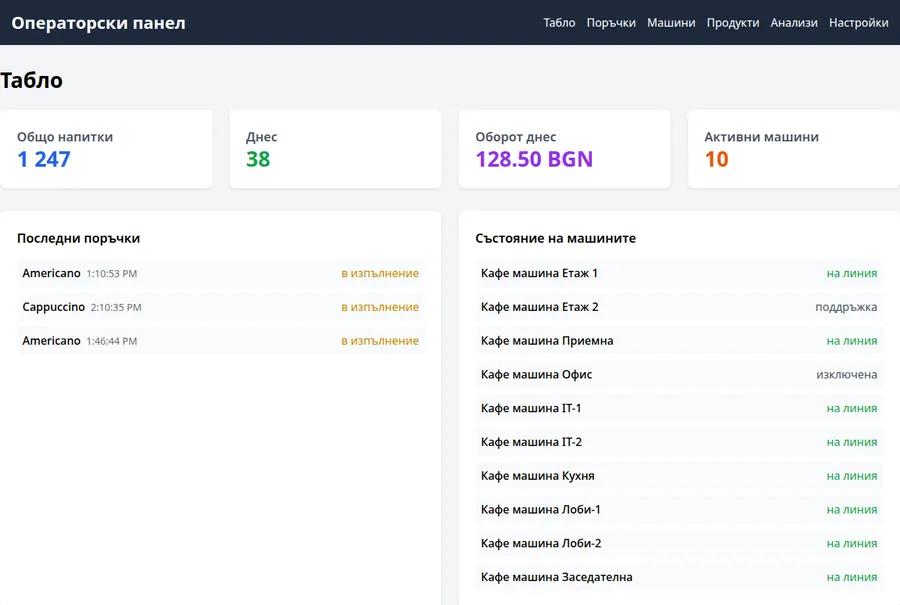
The images on this page show the system in real operation, and the values presented come from that specific installation.
The data above refers to the system presented here. The capabilities of each new installation depend on the brand, model, controller and communication interfaces of the machines.
What you can manage and monitor
Status of all machines
The operator panel shows which machines are connected, which are in operating mode and where an event or interrupted communication has been registered.
Sales and orders
The registered orders, sales and the available turnover data for every connected machine are shown in one place.
Technical diagnostics
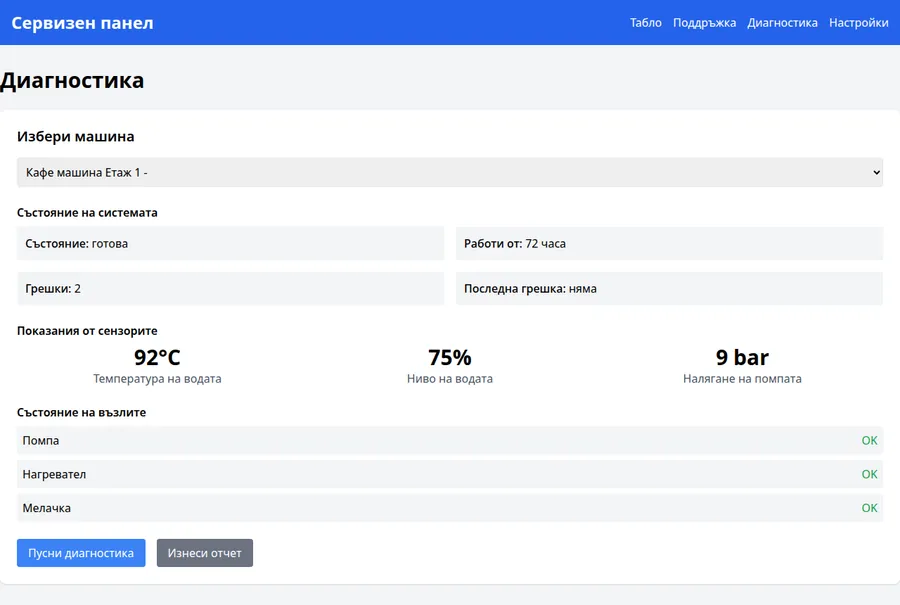
For compatible coffee machines, data can be displayed on water temperature, level, pressure and the condition of the pump, heater, grinder and other components.
Ordering from a phone
The customer scans a QR code and opens the menu directly in the browser, chooses a drink and the available settings and then sends the order to the machine.
Payment from a phone
The system allows mobile payment to be added according to the chosen payment integration and the technical capabilities of the specific machine.
Order tracking
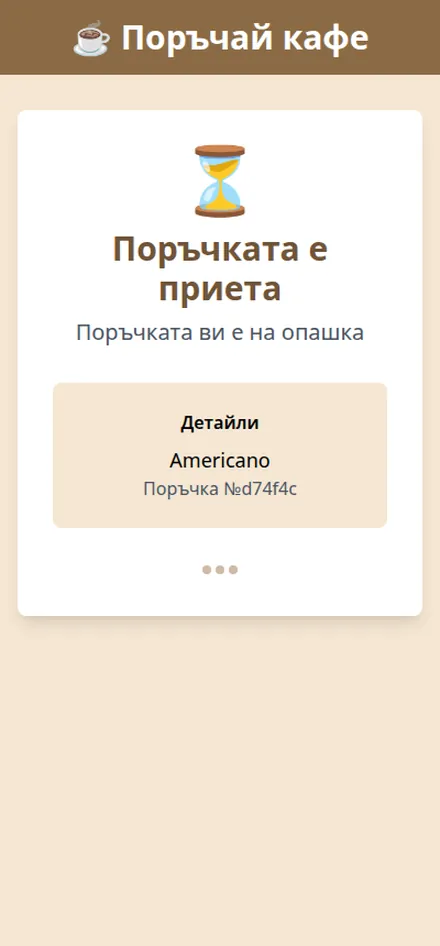
After sending, the customer sees whether the order has been accepted and what stage it has reached, when the machine provides the necessary information.
Built specifically for vending coffee machines
The solution presented is developed for coffee machines and uses the information provided by their controllers. This can include water temperature, level, pressure and the condition of the pump, heater and grinder.
Payment communication can use MDB when the specific machine supports it. Diagnostic data and error codes, however, differ between manufacturers and models.
Machines for food, drinks and other products
Spiral machines, refrigerated units and other types of vending equipment use different components and diagnostic codes. The core platform can be adapted, but a separate technical integration is required.
To check compatibility we need the brand, the model, the type of controller and the available technical documentation of the machine.
Three interfaces in one connected system
Customer interface
The customer scans a QR code, browses the menu, chooses a drink and its settings, pays and follows the order in the phone browser.
Service interface
The technician sees the measurements, states and error codes provided by the machine. This information helps to judge whether a visit is necessary and what preparation may be needed.
Operator interface
The operator monitors all connected machines from a common dashboard — status, latest orders, sales and available technical events.
How a vending machine is connected
1.Compatibility check
We analyse the brand, model, controller, communication interfaces and the data the machine can provide.
2.Connecting the machine
The necessary communication module is added to the compatible machine and the data exchange with the system is configured.
3.Sending the information
The machine transmits the available data to a pre-selected server — the client's or one provided by Digital Planet.
4.Access through web interfaces
The operator, the technician and the customer use separate interfaces with functions and information according to their role.
5.Testing with the real machine
Orders, payments, technical states and behaviour during a communication interruption are checked.
How the system makes management easier
You use the machines you already have
Once technical compatibility is confirmed, the system can be added to the machines you already use, without necessarily replacing the whole equipment.
All machines on one screen
Instead of checking every machine through a separate interface, you get a common overview of the connected equipment.
Better prepared service visits
The available diagnostics help the technician to familiarise themselves with the state of the machine before the visit. It does not replace the physical check and maintenance.
Control over the data
The data can be stored on your server or in infrastructure provided by Digital Planet. Access and retention conditions are defined according to the project.
A more convenient purchase for the customer
The QR menu and mobile payment provide an additional way to order, without the customer necessarily using coins or installing an app.
How the system is used
Integration, equipment and deployment
The software can be integrated with compatible coffee machines you already use. Before preparing a proposal we carry out a technical check of the machine, the controller, the payment interface and the available diagnostic data.
Where needed, Digital Planet can provide the communication module, the connection, the configuration, the server environment, the deployment and the testing of the system.
Send the brand, model and number of machines so that we can make a preliminary technical assessment.
Frequently asked questions
What is vending machine software?
It is a system that connects compatible vending machines to an operator, service and customer interface. It shows the available data on status, sales, orders and technical events.
Can the system be added to existing machines?
Yes, when the machines have a suitable controller and communication interface. Compatibility is determined by the brand, the model and the technical documentation.
Does it work with all types of vending machines?
The solution presented is developed for coffee machines. Machines for food, cold drinks or other products require a separate technical analysis and adaptation.
Does the customer need to install an app?
No. The customer interface opens in the phone browser after scanning a QR code.
How is the payment made?
Payment is made through the configured payment integration. The supported methods depend on the project, the payment provider and the technical capabilities of the machine.
What information does the service technician see?
The technician sees the data provided by the controller of the specific machine. For coffee machines this can include temperature, water level, pressure and the condition of the pump, heater, grinder and error codes.
Where is the data stored?
The system can be deployed on the client's server or in infrastructure provided by Digital Planet.
How is the price determined?
The price depends on the number and models of the machines, the communication interfaces, the payment integration, the required functions and the chosen server environment.
Do you work with clients outside Sofia?
Yes. Digital Planet is based in Sofia and develops software solutions for clients across Bulgaria. On-site deployment is arranged according to the location and the equipment.