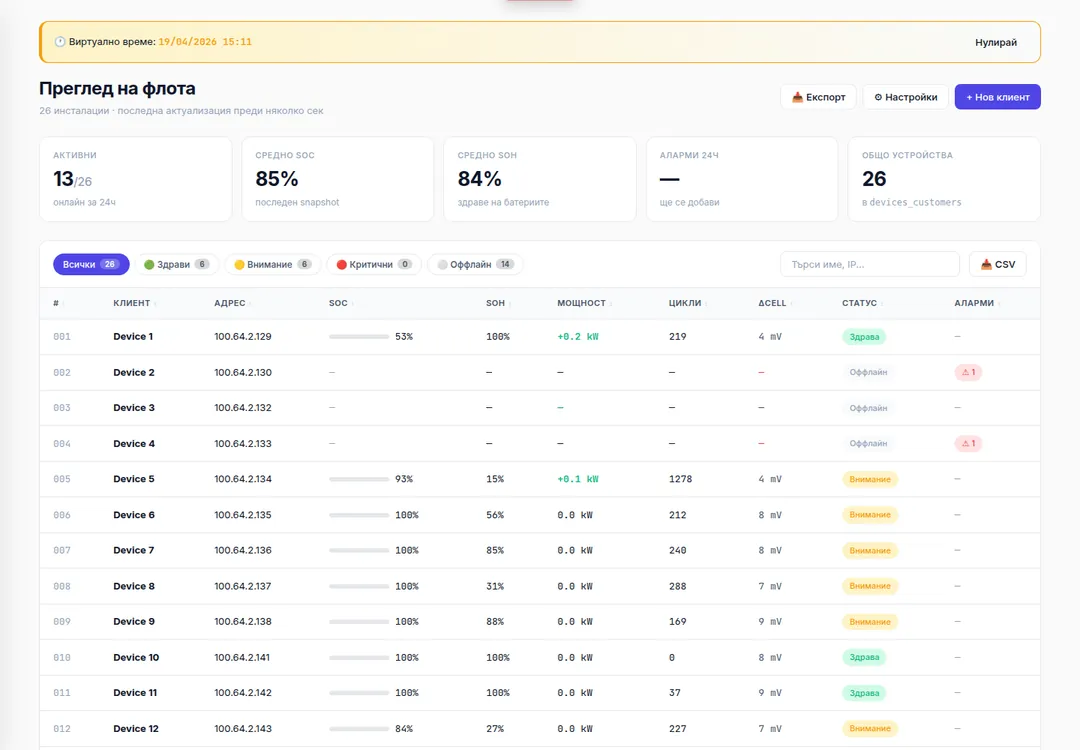
All battery installations in one control panel
Digital Planet develops software for centralised monitoring of battery systems. The platform receives the information that a compatible battery management controller — a BMS — already measures and stores it for later analysis.
From one screen you see which installations are active, which operate within normal limits and which show deviations or interrupted communication. Instead of a single momentary reading, you get a history that allows changes and trends to be tracked over time.
The values above refer to the installation presented here. The capacity of each new solution is determined by the equipment and the requirements of the project.
What you can monitor
Status of all installations
The main dashboard shows the connected systems, their current status and any registered deviations. This way you see where attention is needed without checking every device separately.
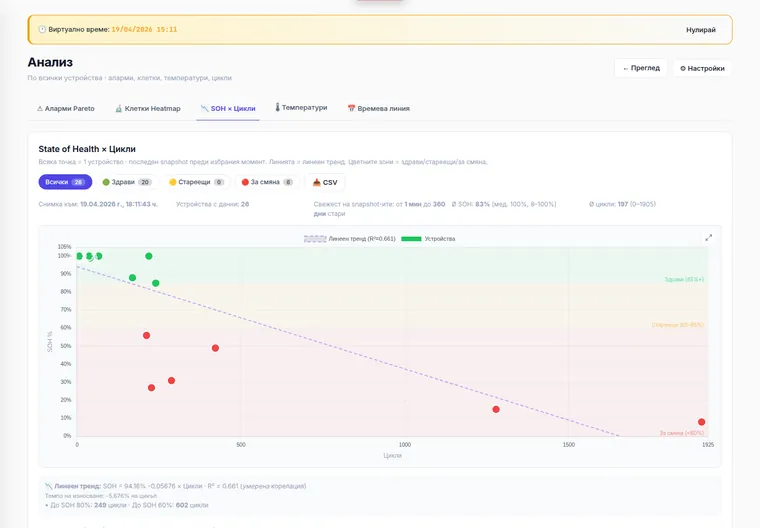
Charge and battery condition
The available data on charge, number of cycles and estimated battery condition is monitored. Comparison over time helps establish whether wear is progressing normally or requires an additional check.
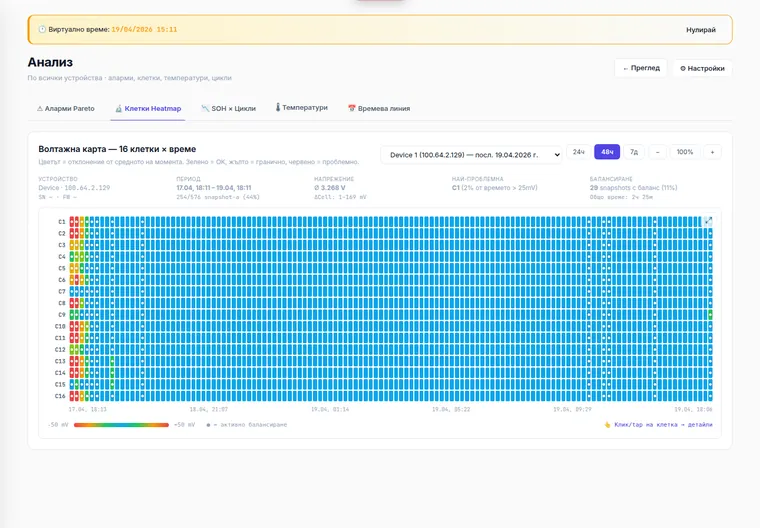
Voltage of every cell
The voltage of individual cells is visualised and compared over time. This makes it possible to notice cells that deviate from the others in the system.
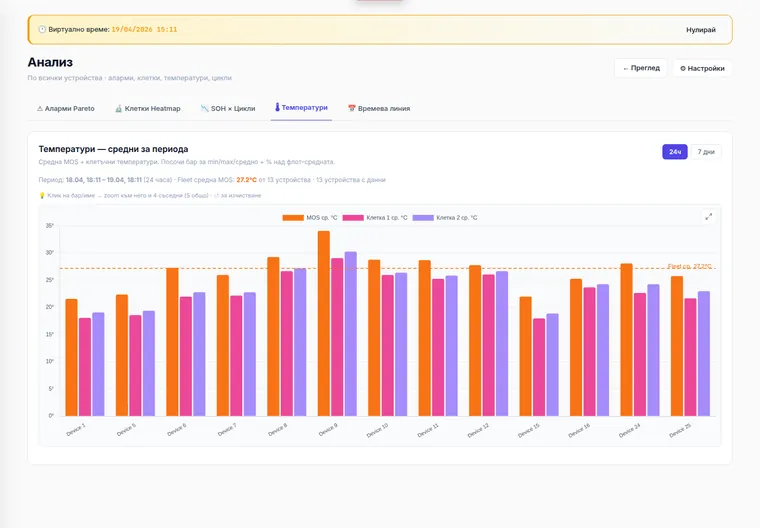
Temperature
Temperature values are compared between devices and against their previous readings. An unusual rise in temperature can be a signal that a technical check is needed.
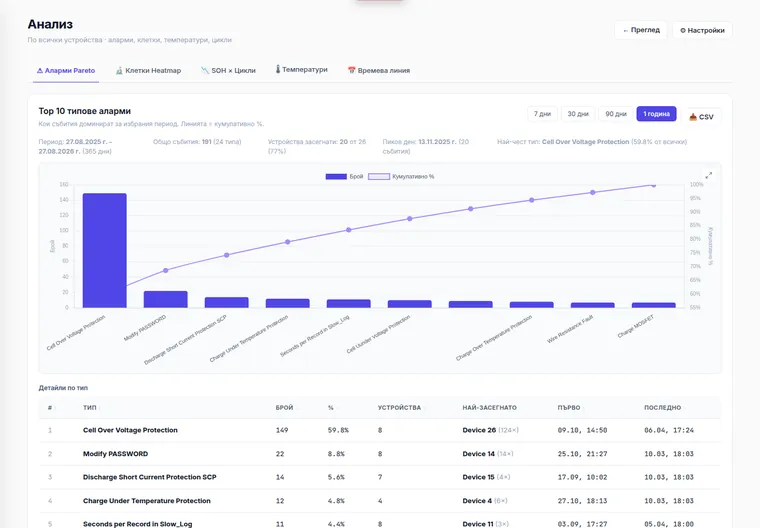
Events and deviations
The system records the registered events and arranges them by type and frequency. This helps identify recurring problems and focus attention on the most frequent causes.
How battery monitoring works
1.Receiving data from the controller
We connect the software to the compatible battery management controller. It provides the available measurements for charge, temperature, cycles, events and cell voltage.
2.Periodic recording
The data is read and stored at a predefined interval. In the system presented this happens every few minutes, but the frequency can be configured for the project.
3.Visualisation and history
Momentary values are arranged into a time history. This allows periods, devices and individual cells to be compared instead of relying on a single reading.
4.Detecting deviations
The control panel shows the registered events and the values outside the configured limits. This assists the technical team in determining the necessary checks and actions.
What the system gives you
Earlier detection of deviations
Gradual changes in capacity, temperature or cell voltage can be noticed before they turn into a visible problem.
History for every device
You can go back to a specific period and check what the values were before, during and after a registered event.
Centralised overview
All connected battery systems are monitored from one dashboard, without opening a separate interface for each device.
Better planning of maintenance
The data and trends assist in planning checks, servicing and replacement. The software does not replace technical maintenance; it provides more information for planning it.
Control over the data
The system can be deployed on the client's server or in infrastructure provided by Digital Planet. The retention period is determined by the project requirements.
How it is used in daily work
Software, connection and full deployment
The software can be integrated with compatible controllers you already use. Before the project starts we check the type of equipment, the communication interface, the available data and the integration options.
Where needed, Digital Planet can provide the necessary connection device, the configuration, the deployment and the testing of the whole solution.
Frequently asked questions
What is a BMS?
A BMS is a battery management controller. It monitors the available indicators such as charge, temperature, cycles and the voltage of individual cells. Digital Planet's software receives this data, stores it and presents it in a common control panel.
What data can be monitored?
That depends on the information provided by the specific controller. In the system presented, charge, condition, temperature, cycles, events and the voltage of individual cells are monitored.
Can the software connect to an existing controller?
Yes, when the controller has a supported communication interface and provides the necessary data. Compatibility is established through a preliminary technical analysis.
How often is the data updated?
The interval is configured according to the equipment and the project requirements. In the solution presented, the data is recorded every few minutes.
Can the system predict the exact date of a failure?
No. The software cannot guarantee an exact date of failure. It shows history, trends and deviations that help the technical team make better-informed decisions.
Does the software replace physical maintenance?
No. The system assists planning and diagnostics, but it does not replace technical checks, measurements and on-site maintenance.
Where is the data stored?
The data can be stored on the client's server or in infrastructure provided by Digital Planet. The retention period and access are defined during the development of the project.
How is the price determined?
The price depends on the number of devices, the type of controllers, the communication method, the recording frequency, the required reports, user roles and the chosen infrastructure.